
Email Security in Dubai: How to Encrypt Emails and Prevent Phishing Attacks
Email is still the way that businesses talk to each other even in a city that moves fast and uses a lot of technology like Dubai. Every day companies here send bills, agreements, human resources papers and customer information through their email accounts without giving it a thought. That easy way to send messages has dangers. One weak password or one wrong click on a bill can let bad people get important company information in just a few seconds. That is why email security in Dubai has become something that all businesses need to worry about no matter how big or small they are, from shops to big companies.
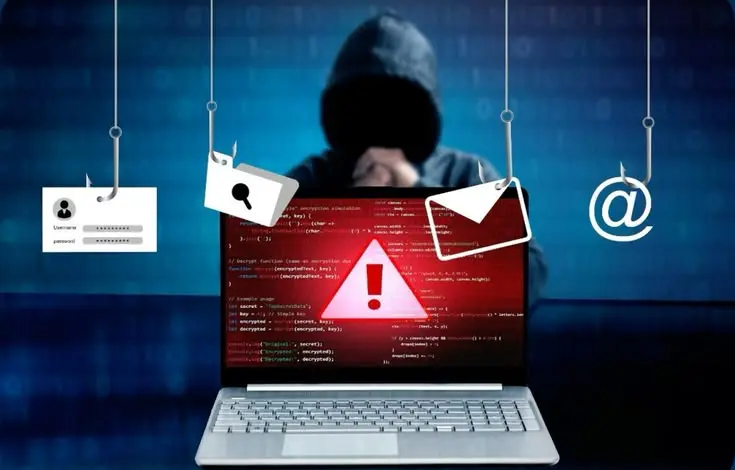
In this guide we will explain what email security really means, how encryption keeps your messages real, and the real steps you can take to stop people from trying to trick you with fake emails before they do any harm. No complicated words. Simple helpful tips that you can use.
What Is Email Security?
Put simply, email security is the set of tools, habits, and policies businesses use to keep their email accounts, messages, and attachments safe from people who shouldn’t have access to them.
A solid approach to email security typically protects against:
- Phishing attacks
- Malware and infected attachments
- Spam and unwanted messages
- Credential theft
- Email spoofing (someone impersonating your domain)
- Business email compromise (BEC)
- Data leakage
- Unauthorised account access
Why It Actually Matters for Your Business
Think about everything that flows through a typical company inbox, client conversations, financial records, employee details, password reset links, and signed contracts. If an attacker gets into just one employee’s mailbox, they could potentially see all of it. That’s why more companies are prioritising email security solutions Dubai businesses can rely on, rather than treating email as an afterthought.
This is also why many companies choose to work with a trusted IT AMC Dubai provider early on, rather than waiting until after a security incident to take email protection seriously.
How to Protect Your Email Messages
I think good email protection is not one tool. It is a mix of habits and technology that work together. Here is where to start.
Use Strong, Unique Passwords
I feel this is basic. Weak passwords are still a top reason accounts get compromised. Staff should avoid:
– Names or birth dates
– Company names
– Simple passwords
– Reusing the same password across multiple accounts
A password manager can make this painless, so there is really no excuse anymore.
Turn On Multi-Factor Authentication (MFA)
I have found that MFA adds a layer of verification on top of your password. Usually a code sent to your phone or generated by an app. Even if an attacker somehow gets hold of a staff member’s password, MFA makes it far harder for them to actually break in.
Encrypt Sensitive Email Messages
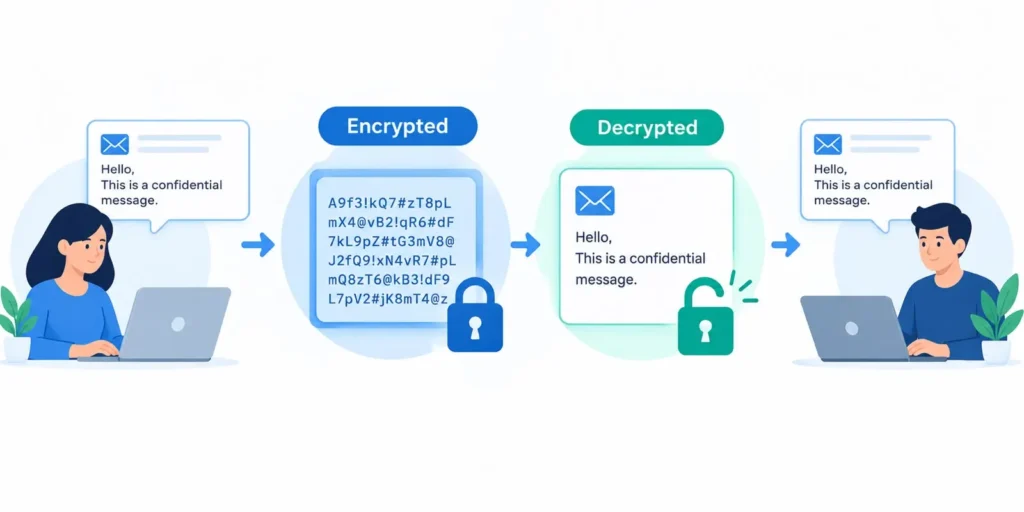
This is where email encryption in Dubai becomes essential for any business handling data. Encryption takes information and scrambles it into a format that unauthorised people cannot easily read even if they intercept the message.
You should be encrypting emails whenever you’re sending:
- Financial documents
- Signed contracts
- Customer or client information
- Confidential business files
- Personal employee data
- Any sensitive company records
Why bother with encryption? A few reasons:
- It protects confidential information from prying eyes
- It reduces your overall data exposure
- It supports genuinely secure business communication
- It keeps sensitive attachments safe even if a mailbox is compromised
How Does Email Encryption Actually Work?
You don’t need a cryptography degree to understand the basics. The general flow looks like this:
Sender → Encryption → Secure Transmission → Decryption → Recipient
Different email setups use different encryption methods, but here are the three you’ll hear about most often:
- TLS encryption — protects data as it travels between mail servers
- End-to-end encryption — makes sure only the sender and intended recipient can read the actual message content
- Encrypted attachments — adds an extra layer of protection specifically for sensitive files
The technical details can get complicated, but the goal is simple: keep your message private from the moment it leaves your outbox to the moment it lands in the right inbox.
It’s worth remembering that email encryption doesn’t exist in isolation; it works best when it’s backed by a stable, well-configured network. Solid networking solutions Dubai businesses’ trust can make a real difference here, since a poorly secured network can undermine even the best encryption setup.
How to Prevent Email Phishing Attacks
Phishing is, without question, one of the biggest email-related threats businesses face today. It’s a form of social engineering where attackers craft convincing fake emails designed to trick people into:
- Clicking malicious links
- Sharing passwords or login details
- Opening infected attachments
- Transferring money to a fraudulent account
- Revealing confidential business information
Because phishing relies on tricking humans rather than breaking through firewalls, phishing protection for businesses has to combine technology with employee awareness; one without the other leaves gaps.
8 Practical Ways to Stop Phishing Before It Happens
1. Check the sender’s email address carefully. Attackers often use addresses that look almost identical to a legitimate one. For example:
accounts@company.com vs. accounts@cornpany.com
At a glance, these look the same. That single swapped letter is exactly what scammers count on.
2. Don’t click suspicious links. Hover over a link before clicking to see where it actually leads. If the destination doesn’t match what’s expected, don’t click.
3. Be cautious with unexpected attachments. This especially applies to:
- ZIP files
- Executable files (.exe)
- Unfamiliar office documents
- Unexpected invoices
- Password-protected archives
4. Verify urgent payment requests Phishing emails love urgency: “Transfer the payment immediately.” If a request feels rushed or out of the ordinary, confirm it through a separate, trusted communication channel before acting.
5. Use email security filters. Good filtering tools catch and block a large percentage of phishing attempts before they ever reach an employee’s inbox.
6. Keep email systems updated. Outdated systems often carry known vulnerabilities that attackers actively look for. Regular updates close those gaps.
7. Train your employees regularly. Technology alone won’t catch everything. Ongoing security awareness training helps staff recognise red flags on their own, one of the most effective forms of email phishing prevention available.
8. Create a clear reporting process Instead of employees quietly deleting suspicious emails, give them a simple way to report them. This helps IT spot patterns and respond faster.
For a deeper technical breakdown of attacker techniques, the joint phishing guidance published by CISA, NSA, FBI, and MS-ISAC is a genuinely useful reference for network defenders.
How to Spot a Phishing Email: A Quick Checklist
| Warning Sign | What to Look For |
| Unexpected sender | Email from someone you weren’t expecting to hear from |
| Urgent language | Pressure to act “immediately” or “now” |
| Suspicious links | Links that don’t match the claimed destination |
| Spelling/grammar issues | Odd phrasing or inconsistent formatting |
| Unusual attachments | Files you weren’t expecting, especially ZIP or EXE |
| Requests for passwords | Legitimate companies rarely ask for this by email |
| Financial transfer requests | Especially ones marked “urgent” or “confidential” |
| Fake login pages | Pages that mimic a real login screen |
| Odd email addresses | Slight misspellings of a known domain |
| Fear-based messaging | Threats about account suspension or penalties |
A quick example of a red flag:
“Your account will be permanently suspended today. Click here immediately to verify your password.”
This ticks almost every box on the list above: urgency, fear, and a suspicious link. Real companies simply don’t operate this way.
Email Authentication: SPF, DKIM, and DMARC
If you want to go a step further with secure email communication in Dubai it is worth understanding these three authentication protocols. These three authentication protocols work together to confirm that emails claiming to come from your domain actually did.
SPF (Sender Policy Framework)
SPF checks whether a mail server is actually authorised to send emails on behalf of your domain.
DKIM (DomainKeys Identified Mail)
DKIM adds a signature to outgoing emails, letting the receiving server verify the message genuinely came from an authorised source and was not tampered with along the way.
DMARC (Domain-based Message Authentication, Reporting & Conformance)
DMARC builds on SPF and DKIM, letting domain owners specify how receiving servers should handle messages that fail authentication checks.
Why These Three Matter Together
- Reduce email spoofing attempts against your domain
- Protect your domain’s reputation
- Improve overall email trust
- Help detect unauthorised email activity
- Cut down on certain impersonation-based phishing attacks
Best Practices Checklist for Secure Business Email
Here’s a condensed list you can actually put into action this week:
- Use strong, unique passwords for every account
- Enable MFA across all business email accounts
- Encrypt sensitive messages and attachments
- Use a secure email gateway
- Set up SPF, DKIM, and DMARC properly
- Keep all email systems and software updated
- Train employees on phishing recognition regularly
- Verify unusual payment requests through a second channel
- Avoid clicking unfamiliar links or opening unexpected attachments
- Monitor for suspicious login activity
- Maintain regular backups of important data
- Have an incident-response process ready before you need it
Why Businesses Need Professional Email Security Solutions
As a business grows, so does the number of inboxes, devices, and entry points an attacker could target. Managing all of that manually becomes harder and riskier over time.
A properly implemented security strategy typically includes:
- Email threat protection
- Anti-spam filtering
- Phishing detection
- Malware protection
- Email encryption
- Domain authentication (SPF, DKIM, DMARC)
- Ongoing security monitoring
- Access controls and permissions
- Clear internal security policies
- Employee awareness programmes
This is usually where working with a dedicated IT AMC service provider makes a real difference, instead of patching things together reactively, you get a proactive, maintained system built around your actual business needs.
Strengthening Email Security With the Right IT Partner
Handling encryption, phishing filters, authentication protocols, and employee training all at once isn’t realistic for most internal teams, especially smaller ones without a dedicated security department. That’s usually the point where businesses bring in outside expertise.
A good IT AMC Service in Dubai typically covers everything from initial security assessments to ongoing filtering, authentication setup, and technical support when something goes wrong — so you’re not left figuring it out on your own after something’s already gone sideways.
If your business is still relying on default settings and hoping for the best, it’s worth pairing that email-focused support with broader IT Support Services in Dubai, so security is handled at the account level and across your wider systems, not just the inbox.
Conclusion
Email security is not about locking a mailbox; it is about shielding business conversations, protecting sensitive information, keeping employee accounts safe, building customer confidence and safeguarding a company’s reputation. Phishing attacks do not slow down. Each year the tricks become more believable. That is why a layered defence is more crucial than ever.
Using email encryption, two‑factor authentication, phishing education and proper authentication rules such as SPF, DKIM and DMARC, together with regular training, gives a business a solid chance to fight these dangers. If you truly want to improve email security in Dubai pairs habits with reliable technical help, behind the scenes instead of trying to build everything from scratch on your own.
FAQ
Email security is the combination of technologies, policies, and habits used to protect email accounts and messages from threats like phishing, malware, spam, spoofing, and unauthorised access.
Use email filtering, MFA, regular employee training, careful link/attachment handling, and authentication protocols like SPF, DKIM, and DMARC.
Email encryption converts the content of a message into a format that unauthorised users can’t easily read, protecting it from interception.
It protects sensitive information like financial records, contracts, and customer data as it travels between sender and recipient.
They’re email authentication protocols that help verify a message actually came from your domain, reducing spoofing and impersonation attempts.
They can catch and block a large share of phishing attempts, but no tool guarantees 100% protection — employee awareness still matters just as much.
Yes. Small businesses are often targeted precisely because attackers assume their defences are weaker. MFA is one of the simplest, most effective safeguards available.
Ideally, at least a few times a year, with periodic simulated phishing tests to reinforce good habits.
Don’t click any links or download attachments. Report it through your company’s internal process so IT can investigate and block similar messages.
A managed provider can assess your current setup, implement encryption and authentication protocols.